

Tracking marketing performance without paid tools is no longer a challenge for businesses with limited budgets.
Whether you run a small company, a solo venture, or a digital marketing agency in Abuja, there are reliable free platforms that let you measure traffic, engagement, conversions, and campaign effectiveness.
By using the right combination of analytics software, tracking setups, and dashboards, you can gain a clear understanding of how your marketing efforts are performing—all without investing in costly subscriptions.
Learning how to track marketing performance without paid tools empowers you to make data-driven decisions, optimize campaigns, and improve ROI while keeping expenses low.
What is the Go-To Tool for Tracking Marketing Performance
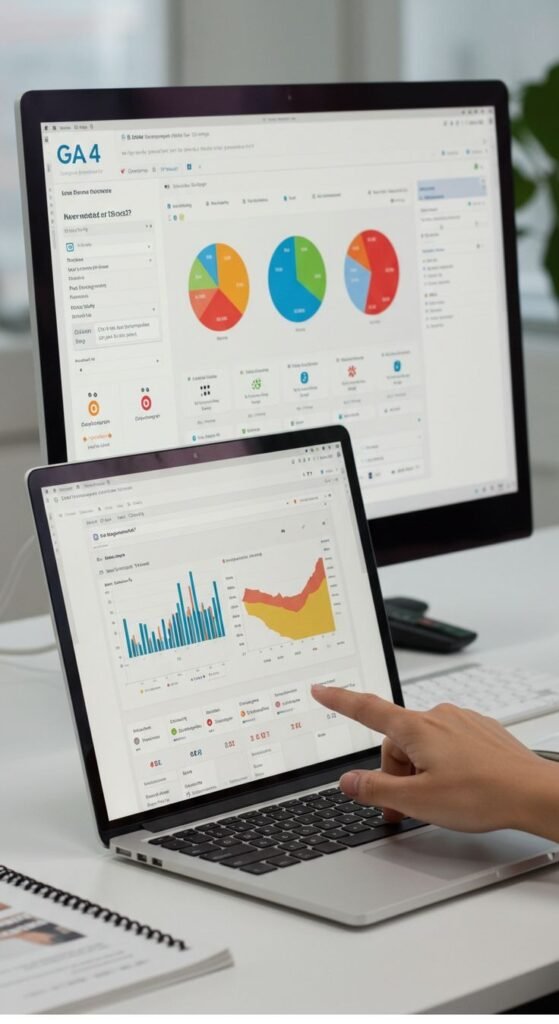
The most commonly used tool for tracking marketing performance, especially for websites, is Google Analytics 4 (GA4).
GA4 gives you insights into how people interact with your website or app: number of users, sessions, conversions, user journeys, and more.
For many marketers, agencies, or freelance digital marketers, GA4 becomes the backbone of performance tracking because:
- It’s completely free.
- It supports event-based tracking—meaning you can track not just page views but button clicks, form submissions, purchases, and more.
- It integrates (in many cases) with other free or low-cost tools for campaign tracking, tagging, dashboards and reporting—giving a full view of marketing performance across channels.
Because of this wide adoption and flexibility, GA4 remains the default go-to for marketers who want robust yet free analytics.
How to Measure Performance in Marketing
Measuring performance in marketing isn’t just about counting pageviews or followers. It’s about understanding the full journey—from awareness to conversion—and seeing what works, what doesn’t, and where you can optimize.
Here’s how to approach marketing performance measurement:
Define Clear KPIs (Key Performance Indicators)
Before you collect data, you need to know what matters. Depending on your goals (brand awareness, lead generation, sales, engagement), your KPIs will change. Common KPIs include:
- Traffic/visitors
- Engagement (time on site, page views per session, bounce rate)
- Conversion rate (form submissions, purchases, downloads)
- Lead generation (newsletter signups, contact form submissions)
- Campaign attribution (which channels — social media, email, SEO — drive the conversions)
- ROI / cost per acquisition / return on ad spend
Use Proper Tracking and Attribution
If you run campaigns across different channels, i.e. social media, email, content marketing, ads—you need to track not only where traffic comes from but which channel actually converted.
That means using tracking parameters (UTM codes), setting up events (for buttons, forms, sales), and choosing an attribution model (last-click, first-click, multi-touch) depending on what you want to measure.
Combine Quantitative and Behavioral Data
Raw numbers (traffic, conversions) tell part of the story. But understanding how users behave—where they drop off, which pages hold their attention, what causes friction—is important too.
Metrics like scroll depth, session recordings, heatmaps, bounce rates, time on page, and user flows help you spot UX or conversion issues.
Build Dashboards and Regular Reporting
Tracking performance should be an ongoing process. Use dashboards—updated daily or weekly—to see trends, compare campaigns, and make data-driven decisions.
That way, you don’t make “guesswork” marketing decisions; you respond to real data.
Analyze and Iterate
Once data starts flowing, look for patterns. Which channels drive most conversions? Which pages have high drop-offs? Where can you optimize content or funnel flows? Use insights to tweak campaigns, improve UX, and refine targeting.
That’s how you measure marketing performance. And now — for the tools to make it happen.
7 Best Free Tools to Track Marketing Performance
Here are seven powerful and free tools (or with free tiers) that you can use to track marketing performance without paid tools.
Many startups venturing into digital marketing, rely on some combination of these to deliver results without raising costs.
- Google Analytics 4 (GA4)
- Matomo (self‑hosted open‑source analytics)
- Microsoft Clarity (user behavior analytics: heatmaps + session recordings)
- Looker Studio (data visualization & dashboarding)
- UTM/URL builders & link tracking tools (free versions)
- Platform-native analytics (social media, email, SEO tools)
- Combined data‑integration + dashboard stack (free or OSS components)
Here’s how each fits in, and what they offer.
- Google Analytics 4
GA4 remains the baseline tool for any marketer because it gives a comprehensive view of website and campaign performance.
You can track pageviews, user sessions, events (signups, purchases, button clicks), user journeys, and conversions.
It also supports cross-device and cross-platform tracking, which is essential if you run campaigns on multiple channels.
Because it’s free, scalable, and integrates well with other tools (tag managers, dashboards, ads), GA4 is often the first step for agencies and businesses that want to track marketing performance without paid tools.
- Matomo
If you prefer more control over your data (or need to meet privacy regulations), Matomo is a great free (self‑hosted) analytics solution.
It allows you to track visits, behavior, conversions, funnels, and even run heatmaps or session recordings, depending on setup.
Matomo becomes especially useful when your clients or business care about data ownership. For a digital marketing agency in Abuja, hosting your own analytics can also avoid issues with data compliance or dependency on external platforms.
- Microsoft Clarity
Numbers don’t tell the full story. Where do people scroll? Where do they stop? Which buttons do they click (or rage‑click)?
That’s where Microsoft Clarity comes in. As a free tool, it offers session recordings, heatmaps, scroll maps, and user journey data.
This helps you understand friction points, UX problems, and conversion blockers—especially useful for optimizing landing pages, forms, or checkout flows.
When combined with GA4 (for quantitative data) or Matomo, Clarity gives qualitative context so you can act on both hard metrics and user behavior.
- Looker Studio
Raw data is useful, but dashboards make it actionable.
Looker Studio (formerly Google Data Studio) is a free data‑visualization and dashboard tool that integrates with sources like GA4, Google Sheets, databases, and more.
It lets you build interactive reports that pull together website analytics, campaign data, ads data, and more, all in one place.
For agencies like Moreed Digital Solutions, Looker Studio is a lifesaver—you can generate client reports, internal performance dashboards, or cross-channel summaries without paying for proprietary BI tools.
- UTM / URL Builders & Link‑Tracking Tools
If you run campaigns across different channels (social media posts, email newsletters, affiliate links, ads), you need a way to know which campaign drove each visit or conversion.
Using UTM parameters on your URLs (source, medium, campaign) helps you tag and track incoming traffic properly.
Free UTM builder tools or URL‑tracking tools (some with free tiers) make this easy.
Once tracked, GA4 or Matomo can capture that data and show which campaigns performed best, helping you with attribution and optimization.
- Native Platform Analytics & Channel‑Level Insights
Often, you don’t need a third‑party tool to gauge performance. Social media platforms, email marketing tools, SEO tools, and ad networks typically have built‑in analytics.
For example: engagement on social posts, email open & click‑through rates, ad click‑through or conversion metrics, search‑engine impressions and click data.
These native analytics tools are free as long as you use the platform.
By combining native analytics with GA4 (or Matomo), you get both channel-level and website-level performance data.
That cross‑channel view is especially helpful if you manage multiple campaigns.
- Combined Data‑Integration + Dashboard Stack (free / open source)
For more advanced setups, you can build a free marketing‑analytics stack using open‑source or free tools. For instance:
- Use open‑source data integration tools to pull data from ad platforms, social media, email tools into a central store.
- Use data warehouses (e.g. databases, Google Sheets, BigQuery) to store and combine data.
- Use Looker Studio or other dashboard tools to visualize and report performance across channels.
This approach requires more setup, but gives you the flexibility and full control usually reserved for paid analytics platforms.
How to Track Marketing Performance Effectively Without Paid Tools
Even without investing in expensive software, you can gain a clear view of how your marketing efforts are performing.
Start by tracking website traffic and user behavior using free tools like GA4, Matomo, or Microsoft Clarity. Installing these tools’ tracking codes collects data on sessions, pageviews, conversions, and user paths.
For more granular insight, such as click patterns, scrolling depth, and drop-off points, Microsoft Clarity provides heatmaps and session recordings, giving you a comprehensive picture of visitor behavior.
To understand which marketing channels are driving conversions, ensure every campaign link is tagged with UTM parameters.
Adding utm_source, utm_medium, and utm_campaign to URLs allows GA4 or Matomo to capture which social media, email, SEO, or paid campaigns generate results.
These tags make it easy to attribute traffic and conversions accurately, letting you focus on channels that deliver tangible outcomes.
You can also build a full marketing performance dashboard without spending a dime.
By combining GA4 or Matomo with Looker Studio, free data integration tools, and native analytics from individual platforms, you can visualize traffic, conversions, user behavior, and campaign results in one central location.
This setup may require manual configuration, especially when pulling data from multiple sources, but it can provide insights comparable to paid tools.
Keep in mind that free tools come with some limitations.
GA4 may sample data for large datasets, Matomo requires hosting and technical upkeep, free link-tracking tools can have usage limits, and dashboards like Looker Studio may struggle with very large or complex datasets.
While setting up, combining, and validating data may take more time than using a bundled paid solution, the benefits are clear: full control over your data, no recurring costs, and actionable insights for small businesses or digital marketing agencies in Abuja, Nigeria.
How a Marketing Agency in Abuja Can Use Free Tools to Deliver Results

Whether or not you’re a digital marketing agency in Abuja, clients generally have tight budgets or are hesitant to invest in premium analytics subscriptions.
Here’s how you can deliver professional tracking and reporting without spending money:
- Implement GA4 (or Matomo) on client websites: track visitors, sessions, conversions, events, and set up goals (form fills, purchases, downloads).
- Use UTM tagging for all campaigns: every social post, email, newsletter, affiliate link, or paid placement gets UTM parameters so you can attribute conversions correctly.
- Use Microsoft Clarity: for user behavior insights, heatmaps, session recordings. Helps you spot UX problems, friction, or content drop‑offs.
- Build unified dashboards with Looker Studio: combine website analytics, campaign data, ads performance, email stats into a single view. Easy for clients to understand.
- Run regular analyses and reporting cycles: which channels are converting, cost per acquisition (if tracking ad spend), which campaigns to scale, what to improve.
- Optimize using data: adjust content, landing pages, campaigns based on what the data shows. Use behavior insights to refine UX, funnels, calls‑to‑action.
This stack gives you everything a paid analytics tool offers, at zero cost. It also builds trust with clients: you show real numbers, transparent attribution, and actionable insights.
When Paid Tools Might Make Sense
While free tools are powerful, there are situations where paid tools or premium analytics solutions might still make sense:
- Large-scale operations: If you handle many clients with huge traffic volumes, complex data needs, multi-market campaigns, or heavy e‑commerce — free tools may start to feel limited or require heavy maintenance.
- Advanced attribution, multi-touch modelling, cross-platform ad tracking: For truly sophisticated attribution (e.g. multi-touch, cross-device, cross-platform), you might need more advanced tools or data‑science support.
- Automation and reporting for many clients at once: Paid tools often offer unified dashboards, white-label reporting, automation, scheduled reporting — which saves time if you manage many clients.
- Support, reliability, compliance, data privacy safeguards: With paid tools, you often get vendor support, guaranteed uptime, regular updates, and compliance features — which matter if you handle sensitive client data.
In those cases, a hybrid approach makes sense: use free tools as the foundation, and layer paid tools only where they deliver real value.
Conclusion
If you’ve been waiting for the “perfect moment” to invest in analytics tools for your business or agency, you don’t need to wait.
With tools like GA4, Matomo, Microsoft Clarity, Looker Studio, free link tracking and UTM tagging, you already have everything you need to track marketing performance, measure conversions, understand user behavior, and make data‑driven decisions.
It’s not about how much you spend, it’s about how well you set things up: define your goals, track consistently, analyse smartly, and iterate.
For a digital marketing agency in Abuja, or any small business working with limited budgets—this approach isn’t just viable. It’s smart.


The Ultimate Guide to Digital Marketing Strategies for Startups in 2025 – Moreed Digital Solutions: Digital Marketing Agency in Nigeria
December 10, 2025[…] that adopt a structured approach can scale efficiently, measure performance accurately, and adapt to changing market […]
Lookalike Audience Modeling: Important Facts You Need To Win In 2026
December 31, 2025[…] track and optimize: measure key metrics like CPA (cost per acquisition), ROAS (return on ad spend), and conversion rates relative to other […]
Core Web Vitals in 2025: What Has Changed and What’s New – Moreed Digital Solutions: Digital Marketing Agency in Nigeria
January 10, 2026[…] Track the change in metrics before and after deployments or changes. That gives you accountability and lets you see which fixes truly moved the needle. […]
Types of Digital Marketing: A Complete Guide for Modern Businesses in 2026 – Moreed Digital Solutions: Digital Marketing Agency in Nigeria
January 28, 2026[…] Every interaction can be tracked, analyzed, and optimized, allowing businesses to improve performance continuously. […]